

Vizop - Layer of Protection Analysis (LOPA) Software
IEC-Compliant LOPA, Fully Integrated with Your HAZOP Workflow!
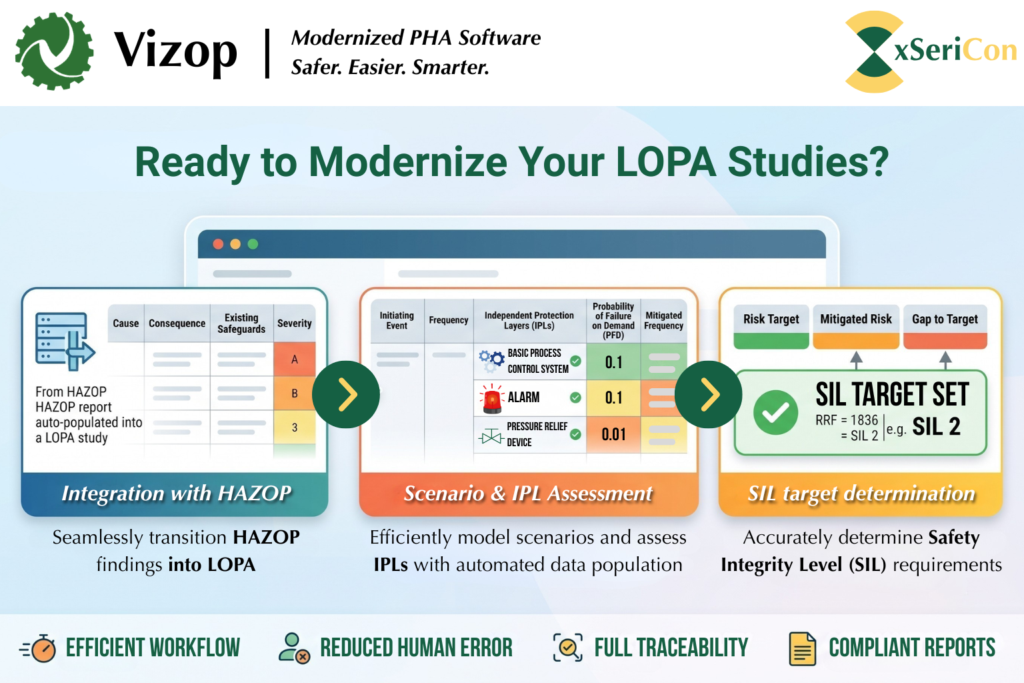
Vizop Modernize Your LOPA Studies: Integrated LOPA workflow helps your team perform faster, more consistent, and fully traceable Layer of Protection Analysis studies.
Vizop Now Supports LOPA: Seamless import directly from your HAZOP
Built Around Real Engineering Workflows
Unlike standalone LOPA spreadsheets or legacy software, VIZOP integrates LOPA directly into your existing process safety studies.
This means less repetitive work, fewer transcription errors, and complete traceability throughout the safety lifecycle.
Key Benefits:
-
Fully integrated with Vizop HAZOP
-
IEC-compliant LOPA methodology
-
Automatic HAZOP-to-SIF workflow
-
Multiple initiating events per scenario
-
Multi-risk receptor assessment
-
Efficient worksheet design
-
Professional Excel reporting
-
Advanced support for Low Demand, High Demand, and Continuous Mode SIFs
- From HAZOP to LOPA in Two Clicks
- IEC-Compliant Traceability
- Comprehensive Semi-Quantitative LOPA
One of the biggest challenges with traditional LOPA is manually recreating information already developed during HAZOP.
VIZOP eliminates this unnecessary work.
Simply select the safeguard during your HAZOP study, and VIZOP automatically creates a new Safety Instrumented Function by identifying:
- Sensor tag
- Final element
- Initiating cause
- Consequence
- Independent Protection Layers (IPLs)
- Severity ranking
The generated SIF maintains a direct reference back to the originating HAZOP worksheet, providing complete traceability for audits and lifecycle management.
Functional safety standards require clear traceability throughout the safety lifecycle.
Every automatically generated SIF includes a direct reference to its originating HAZOP scenario.
With a single click, engineers can jump directly between the LOPA worksheet and the corresponding HAZOP deviation, ensuring documentation remains accurate, transparent, and audit-ready.
VIZOP supports all standard semi-quantitative LOPA requirements, including:
- Multiple initiating events
- Enabling conditions
- Conditional modifiers
- Independent Protection Layers (IPLs)
- Multiple consequences
- Multiple risk receptors
- Separate calculations for:
- Personnel Safety
- Environmental Impact
- Financial Impact
Comments, assumptions, and action items are managed using VIZOP’s integrated Annotation system, providing a consistent user experience across both HAZOP and LOPA studies.
Designed for Engineering Efficiency
Traditional LOPA worksheets often require excessive scrolling, duplicated information, and repetitive calculations. Yet, Vizop was designed differently.
- Document complexity
- Duplicated information
- Repetitive calculations
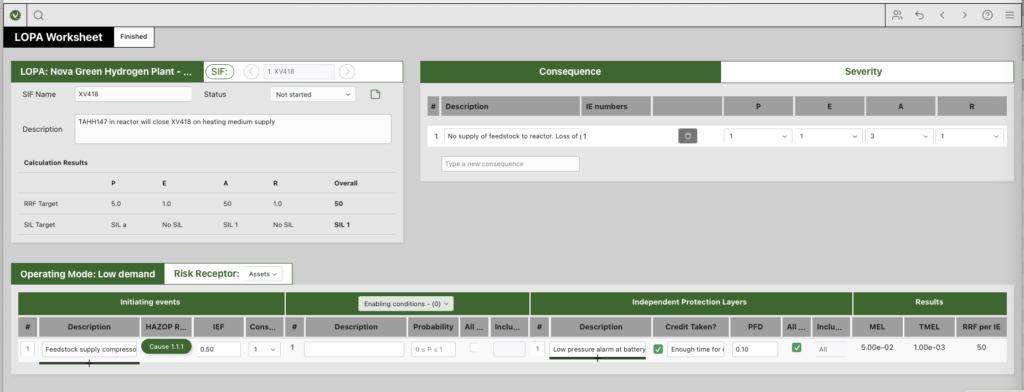
Our compact worksheet layout keeps all relevant information visible on a single screen wherever possible, allowing engineers to focus on analysis instead of navigating spreadsheets.
Additional workflow improvements include:
- Excel import of SIF Lists
- Excel export of completed LOPA worksheets
- Rapid SIF editing and duplication
- Rearrange SIFs with ease
- Shared TMEL risk matrices with HAZOP studies
Advanced LOPA Capabilities
VIZOP includes several advanced capabilities rarely found in conventional LOPA software.
Flexible IPL Management
Individual IPLs can be enabled or disabled with a single click, while optional justification fields document why credit is—or is not—taken.
Multiple Operating Modes
Support for:
- Low Demand
- High Demand
- Continuous Mode
Many LOPA applications only support Low Demand operation.
Intelligent Risk Calculations
Optional calculation modes include:
- Ignore scenarios where TMEL has already been achieved
- Calculate based only on the largest risk gap
- Ignore incomplete risk receptors without requiring placeholder data
These options provide greater flexibility while reducing unnecessary engineering effort.
FAQs
1. How does Vizop save time when transitioning from HAZOP to LOPA?
Vizop eliminates redundant data entry with its powerful “two-click” SIF creation. By simply right-clicking a safeguard with a tag number in your HAZOP worksheet, Vizop automatically creates a new Safety Instrumented Function (SIF). It instantly populates the new SIF with the sensor, final element, cause (initiating event), consequence, severity ranking, and transfers any other safeguards over as Independent Protection Layers (IPLs).
2. Does Vizop ensure traceability to comply with IEC functional safety standards?
Yes. To ensure strict compliance and traceability, Vizop automatically provides a HAZOP reference button inside the LOPA worksheet for any SIF generated from a HAZOP. Clicking this button instantly jumps you back to the exact linked cause in the original HAZOP worksheet.
3. Can Vizop handle high demand or continuous mode SIFs?
Absolutely. While many legacy apps only handle low demand scenarios, Vizop is engineered with full support for low demand, high demand, and continuous mode SIFs. For high demand and continuous modes, Vizop automatically calculates the target Probability of Failure per Hour (PFH), making it perfect for machine safety applications.
4. How does Vizop manage different risk receptors (e.g., Safety vs. Environmental)?
Vizop performs separate LOPA calculations for each specific risk receptor, such as safety, environmental impact, and financial impact. Furthermore, you can apply enabling conditions and conditional modifiers (like an occupancy factor) to specific risk receptors in just two clicks. This prevents you from having to repeatedly type out the same factors for each receptor, saving massive amounts of time and reducing errors.
5. How does Vizop handle Independent Protection Layer (IPL) justifications?
Vizop offers a unique and highly requested feature for IPL management. You can easily ‘switch off’ an IPL using a simple checkbox, while simultaneously providing a dedicated “justification” textbox to clearly explain why credit is or isn’t being taken for that layer.
6. Do I need to create a separate Risk Matrix for LOPA?
No. Vizop utilizes the exact same Excel-formatted Risk Matrix to define Tolerable Risk (TMEL) values in LOPA that you already use for your HAZOP risk rankings.
7. Does Vizop prevent needless SIL target increases?
Yes. Many legacy apps automatically add 1 unit of Risk Reduction Factor (RRF) to scenarios that already meet the tolerable risk criteria, artificially inflating SIL targets. Vizop’s calculation rules are flexible; you can set the system to ignore scenarios where the TMEL is already met, or even configure it to consider only the scenario with the biggest risk gap (the ‘worst case’) rather than summing the risk reduction requirement for all cases.
8. Can I import my existing SIF lists?
Yes. Vizop allows you to easily import or update SIFs directly from an Excel file. The import cleanly brings in all initiators, final elements, causes, consequences of failure, and IPLs (handling unlimited numbers of causes and consequences per SIF).
9. Will the final LOPA worksheet require hours of formatting for my Word report?
No. Vizop’s LOPA worksheet is designed to be incredibly compact and efficient, removing the need to endlessly scroll left, right, up, or down. When your study is complete, you can export a beautifully formatted SIF List and full LOPA worksheet to Excel in a few clicks, perfectly sized to copy-paste directly into your Word SIL Assessment report with absolutely no reformatting needed.
Join Our Mailing List
Get first hand xSeriCon updates, articles, webinars and more!